
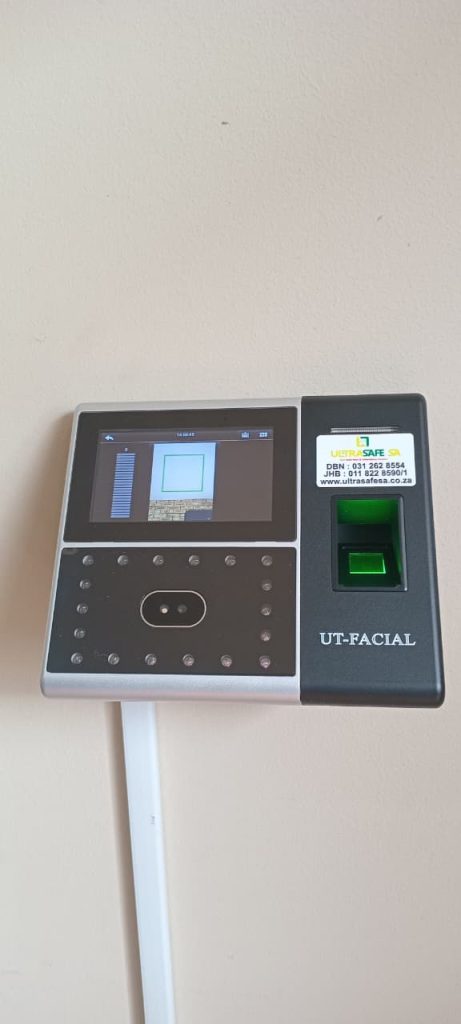
How to Choose the Right Biometric Clocking System for Your Business
Managing employee attendance accurately is essential for every business, regardless of size or industry. From reducing payroll errors to improving accountability, a biometric clocking system provides a secure and efficient way to track employee working hours.
With so many options available, selecting the right solution can seem overwhelming. Understanding your business’s unique requirements and the features available will help you invest in a system that improves productivity while delivering long-term value.
What Is a Biometric Clocking System?
A biometric clocking system identifies employees using unique physical characteristics such as fingerprints, facial recognition, or palm recognition. Unlike traditional punch cards or PIN codes, biometric data cannot easily be shared or duplicated, making attendance records far more accurate.
These systems eliminate common issues such as forgotten cards, lost access tags, or employees clocking in on behalf of colleagues.
Why Businesses Are Moving Away from Traditional Clocking Methods
Many organisations still rely on paper registers, clock cards, or PIN-based systems. While these methods may appear inexpensive initially, they often create administrative challenges, including:
- Payroll inaccuracies
- Time theft and buddy punching
- Lost or damaged cards
- Increased administrative workload
- Limited reporting capabilities
- Difficulty monitoring multiple locations
Biometric systems automate attendance recording, making workforce management significantly more efficient.
Identify Your Business Requirements
Before selecting a biometric attendance solution, consider how your organisation operates.
Ask yourself:
- How many employees need to clock in?
- Do staff work from multiple locations?
- Do employees work shifts?
- Will contractors or temporary staff use the system?
- Does your payroll software require attendance integration?
- Are you planning to grow your workforce?
Answering these questions helps determine the type of hardware and software your business requires.
Choosing the Right Biometric Technology
Fingerprint Recognition
Fingerprint systems remain one of the most popular options because they are affordable, accurate, and easy to use.
They are ideal for:
- Offices
- Factories
- Warehouses
- Retail stores
- Schools
Facial Recognition
Facial recognition technology offers completely contactless attendance recording.
It is particularly suitable for:
- Healthcare facilities
- High-traffic workplaces
- Businesses with hygiene requirements
- Modern office environments
Many advanced facial recognition systems can accurately identify employees even when they wear glasses or protective equipment.
Multi-Modal Systems
Some businesses benefit from systems that support multiple authentication methods, including:
- Fingerprint
- Facial recognition
- RFID cards
- PIN codes
This flexibility accommodates different employee roles and working environments.
Consider Payroll Integration
One of the biggest advantages of modern biometric systems is automatic payroll integration.
Rather than manually calculating hours worked, attendance data can be transferred directly into payroll software, helping businesses:
- Reduce payroll errors
- Eliminate duplicate data entry
- Save administrative time
- Improve reporting accuracy
- Ensure consistent attendance records
For organisations with large workforces, this automation can save many hours every month.
Think About Scalability
Your attendance system should continue meeting your needs as your business grows.
Look for solutions that can easily accommodate:
- Additional employees
- Multiple branches
- Remote locations
- New departments
- Future software upgrades
Choosing a scalable solution avoids the expense of replacing your entire system later.
Essential Features to Look For
A quality biometric clocking system should include:
- Fast employee verification
- Cloud-based reporting
- Mobile management options
- Real-time attendance monitoring
- Leave management
- Overtime tracking
- Shift scheduling
- Audit trails
- Data backup
- User-friendly software
These features simplify workforce management while providing valuable business insights.
Security and Data Protection
Employee biometric information must be handled responsibly.
Choose a provider that offers:
- Encrypted biometric templates
- Secure data storage
- Role-based user permissions
- Regular software updates
- Compliance with applicable data protection requirements
Protecting sensitive employee information should always be a priority.
Industry-Specific Considerations
Different industries have unique attendance requirements.
Manufacturing
Manufacturers often require rugged biometric devices capable of operating in dusty or industrial environments while supporting multiple shift patterns.
Retail
Retail businesses benefit from systems that simplify shift scheduling, monitor overtime, and accommodate seasonal staff.
Healthcare
Hospitals and medical facilities often prefer contactless facial recognition systems that reduce physical contact while maintaining strict security.
Construction
Construction companies frequently need mobile or multi-site attendance solutions to accurately track workers across different project locations.
Education
Schools and colleges can use biometric attendance systems to improve staff accountability while integrating attendance data with administrative processes.
Cloud-Based vs On-Premise Systems
Modern cloud-based solutions provide several advantages over traditional on-premise installations.
Cloud systems allow businesses to:
- View attendance from anywhere
- Receive real-time reports
- Manage multiple branches from one dashboard
- Reduce IT infrastructure costs
- Automatically receive software updates
On-premise systems may still suit organisations with strict internal infrastructure requirements or limited internet connectivity.
Questions to Ask Before Purchasing
Before making a decision, ask your supplier:
- How accurate is the biometric recognition?
- How quickly can employees clock in?
- Can the system integrate with payroll software?
- Is training included?
- What ongoing support is available?
- How are software updates managed?
- Can the system expand as the business grows?
- What warranty is provided?
A reputable supplier should be able to answer these questions clearly and recommend a solution based on your operational needs.
Why Professional Installation Matters
Even the best biometric hardware performs poorly if it is installed incorrectly.
Professional installation ensures:
- Correct device placement
- Reliable network connectivity
- Proper software configuration
- Secure user permissions
- Accurate attendance reporting
- Staff training for smooth adoption
Ongoing technical support also helps minimise downtime and keeps your system operating efficiently.
Choose a Solution That Supports Your Business Growth
A biometric clocking system is more than an attendance device—it is an investment in operational efficiency, payroll accuracy, and workplace security. By carefully considering your workforce size, industry requirements, integration needs, and future growth, you can choose a solution that delivers lasting value.
At Ultrasafe SA, we provide advanced biometric clocking systems designed for businesses across South Africa. Whether you operate a small office, a large manufacturing facility, a retail chain, or a multi-site organisation, our team can recommend and install a solution tailored to your operational requirements.
Contact Ultrasafe SA today to discuss the right biometric attendance system for your business and discover how automation can simplify workforce management.