
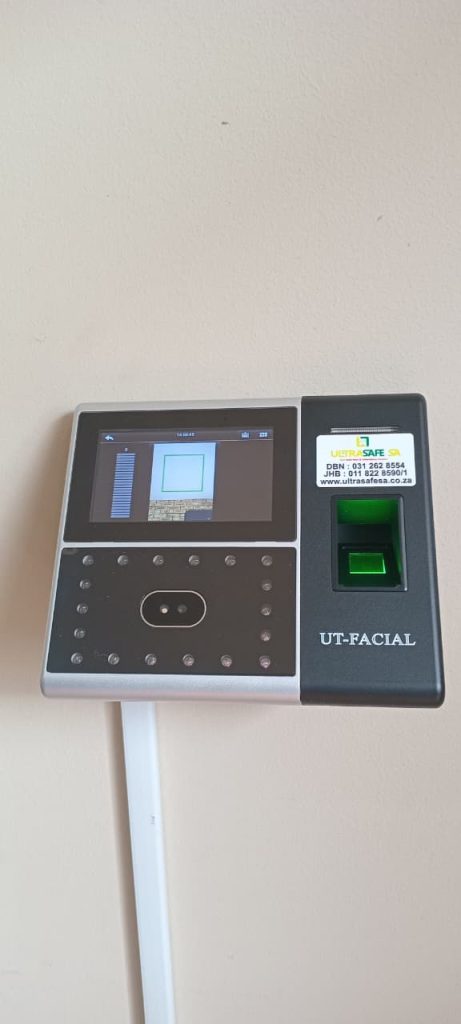
Facial Recognition Clocking Machine in Germiston
Facial Recognition Clocking Machine in Germiston: A Complete Guide
Managing employee attendance at a busy industrial facility or commercial business in Germiston requires an efficient, reliable system. Manual sign-in books, traditional punch cards and outdated fingerprint scanners can cause unnecessary queues, inaccurate timesheets and payroll administration challenges.
A facial recognition clocking machine in Germiston offers a modern alternative by allowing employees to clock in and out using biometric facial verification. Instead of handling access cards or touching a shared fingerprint scanner, employees can verify their identities at a compatible facial recognition terminal.
For manufacturing plants, warehouses, engineering workshops and commercial offices, this technology can help streamline shift changes, improve attendance records and strengthen workplace security.
ULTRASAFE SA provides security and time-and-attendance solutions designed to help businesses manage employee access and attendance more efficiently.
Why Businesses in Germiston Are Choosing Facial Recognition Clocking Machines
Germiston is home to a wide range of industrial, manufacturing, logistics and commercial operations. Businesses with large workforces often need to process employee arrivals quickly while maintaining accurate attendance records.
Traditional attendance systems can create several problems:
- Long queues: Employees may experience delays when clocking in during busy shift changes.
- Buddy clocking: Employees may clock in for colleagues when using shared cards or manual sign-in methods.
- Inaccurate records: Handwritten attendance sheets can contain errors or missing information.
- Fingerprint recognition difficulties: Dirty, wet or worn fingerprints may affect the performance of some fingerprint scanners.
- Administrative workload: Managers may spend considerable time checking attendance records and correcting payroll discrepancies.
A facial recognition clocking machine helps address these challenges by verifying employees using their facial features and recording attendance electronically.
Depending on the terminal’s specifications, recognition can take place within seconds, helping businesses reduce queues and maintain more consistent attendance records.
How Does a Facial Recognition Clocking Machine Work?
A facial recognition clocking system uses a camera and biometric software to compare an employee’s facial features with an authorised template registered on the device.
The process generally follows these steps:
- Employee registration: An authorised administrator registers each employee on the system.
- Facial verification: The employee looks towards the terminal when arriving or leaving.
- Identity matching: The device compares the captured facial information with an enrolled template.
- Attendance recording: The system records the clock-in or clock-out event, including its timestamp.
- Record management: Attendance information can be retrieved, reviewed and exported or synchronised with compatible software.
Depending on the model and configuration, the terminal may also support access control, PIN verification, attendance reporting and integration with compatible management systems.
These features allow businesses to manage employee attendance more efficiently without relying entirely on manual paperwork.
Facial Recognition vs Fingerprint and Manual Clocking Systems
Choosing the right employee attendance system depends on your workforce, operating environment and reporting requirements.
| Feature | Manual Attendance | Fingerprint Scanner | Facial Recognition |
|---|---|---|---|
| Physical contact | Usually required | Required | Not usually required |
| Buddy clocking prevention | Limited | Stronger than cards alone | Stronger than cards alone |
| Performance with dirty hands | Not applicable | May be affected | Does not depend on clean fingers |
| Digital attendance records | Requires manual entry or digitisation | Usually supported | Usually supported |
| Payroll reporting | More manual work | Depends on software | Depends on software |
| Access control integration | Limited | Available on compatible models | Available on compatible models |
Facial recognition can be particularly useful in industrial environments where employees wear gloves or work with materials that make fingerprint scanning less convenient.
However, actual recognition speed, environmental tolerance and security performance depend on the selected device. Businesses should confirm these specifications before installation.
Combining Facial Recognition With Biometric and Keypad Access Control
A modern attendance system can do more than record employee working hours. When connected to compatible access control equipment, it can also help regulate entry into restricted areas.
Biometric and keypad access control can be used to manage access to offices, warehouses, server rooms, stockrooms and other controlled areas.
Depending on the installed equipment, a combined system may support:
- Facial recognition for authorised employee verification.
- PIN entry for additional authentication.
- Electronic door locks and access-controlled entrances.
- Compatible pedestrian turnstiles and entry barriers.
- Individual access permissions for employees and contractors.
- Attendance records linked to access events.
For example, a Germiston warehouse can use facial recognition to verify an employee before granting access to an authorised entrance. The system may also record the employee’s attendance event, provided the terminal and software are configured to support this functionality.
For sensitive areas, businesses should consider whether additional authentication is appropriate. Temporary visitors and contractors should be managed through approved access procedures rather than being given unrestricted access to employee credentials.
Choosing a Reliable Clocking Machine for Industrial Environments
Industrial environments can expose electronic equipment to dust, temperature changes, vibration and inconsistent power supplies. Choosing suitable hardware is therefore important for reliable operation.
Before installing a facial recognition clocking machine in Germiston, consider the following factors.
1. Recognition Technology
Check whether the terminal supports the required facial verification technology and whether it includes anti-spoofing or liveness detection. These features can help reduce attempts to authenticate using photographs or other artificial representations, depending on the device’s capabilities.
2. Employee Capacity
Choose a terminal that supports the number of employees who will be registered. Consider future workforce growth and the number of people expected to clock in during peak periods.
3. Attendance Reporting and Payroll Compatibility
Confirm that the device supports the reporting features your business needs. Check whether attendance records can be exported or integrated with your existing time-and-attendance or payroll software.
4. Connectivity and Offline Storage
Some devices can store attendance records locally when a network connection is unavailable and synchronise them when connectivity returns. Confirm the terminal’s storage capacity, synchronisation process and data-retention limits.
5. Power Backup
Power interruptions can affect access control and attendance equipment. A suitable backup power supply may help keep essential components operating during an outage. The required backup capacity will depend on the terminal, connected locks and other equipment.
6. Installation and Technical Support
Professional installation helps ensure that the terminal is positioned correctly, connected to compatible equipment and configured to meet your operational requirements.
ULTRASAFE SA can help businesses assess their attendance and access control needs and identify suitable equipment for their premises.
Can Facial Recognition Clocking Machines Work With Safety Equipment?
Many businesses in Germiston operate environments where employees wear hard hats, protective clothing, safety glasses and other personal protective equipment.
Facial recognition performance can vary depending on the terminal, camera placement, lighting conditions and the amount of the face obscured by protective equipment.
Before selecting a system, test it with the safety equipment employees wear during their normal shifts. Confirm whether prescription glasses, facial hair, protective eyewear and hard hats affect recognition.
This is especially important for manufacturing plants, construction-related operations and industrial warehouses where protective equipment is compulsory.
Protecting Employee Information and Biometric Data
Facial recognition systems process biometric information, so businesses should consider privacy and information security before implementation.
In South Africa, the Protection of Personal Information Act (POPIA) is relevant to the collection and processing of personal information, including biometric information.
Businesses should assess the lawful basis for processing, explain the system’s purpose to employees, restrict access to attendance records and implement appropriate security safeguards. Biometric information can receive special protection under POPIA, so organisations should assess the applicable requirements and any relevant exceptions before deployment.
It is also important to confirm how the device stores biometric templates, whether data is encrypted, who can access it and how information is retained or deleted.
A well-planned implementation should balance efficient attendance management with responsible handling of employee information.
Frequently Asked Questions
How does a facial recognition clocking machine improve payroll accuracy?
It records attendance events electronically, reducing reliance on handwritten timesheets and manual data entry. Accurate payroll calculations still depend on correct configuration, attendance rules, exception handling and compatible payroll software.
Can employees clock in for absent colleagues?
Facial recognition makes this more difficult than systems based solely on cards or sign-in books because the terminal checks the person presenting themselves. Effectiveness depends on the device’s verification and anti-spoofing capabilities.
Will facial recognition work if employees wear glasses or hard hats?
It depends on the device and how much of the employee’s face is obscured. Confirm compatibility with the protective equipment used at your premises and test the terminal under normal working conditions.
Can a facial recognition clocking machine control doors and turnstiles?
Some models support integration with compatible electronic locks, turnstiles and other access control equipment. Confirm the terminal’s relay outputs, supported interfaces and installation requirements before purchasing.
What happens during a power failure?
The outcome depends on the equipment and backup arrangements. A suitable UPS or battery backup may keep selected components operating during an outage. Some terminals also retain attendance records locally, but storage and synchronisation capabilities vary by model.
Is facial recognition suitable for small businesses?
Yes. It can benefit small businesses as well as larger industrial operations, particularly where accurate attendance records and controlled access are important. The best solution depends on staff numbers, budget, reporting requirements and the need for access control.
Improve Workplace Attendance Management With ULTRASAFE SA
An effective attendance system can help businesses reduce manual administration, maintain more reliable employee records and improve control over authorised access.
Whether you manage a warehouse, manufacturing facility, engineering workshop or commercial office in Germiston, a suitable facial recognition clocking machine can support more efficient workforce management.
ULTRASAFE SA can help you explore time-and-attendance and access control solutions suited to your operational requirements.
Contact ULTRASAFE SA today to discuss your requirements for a facial recognition clocking machine in Germiston and find a suitable solution for your business.